
Fareed Mohmed · Engineering
Field Device to PLC Wiring
Device · Cable tray · Panel · PLC card
Follow every signal from the field device to the PLC. Pick a sensor, transmitter, load cell, RTD, thermocouple, solenoid valve, servo, stepper, VFD, encoder, pushbutton, safety device or fieldbus link, and see a colour-coded diagram of each wire from the device, through the cable tray and the panel terminals, to the PLC card, with the steps, the cable, the common mistakes and what to test before you run. Then read how to route the cables, lay out the panel and earth the screens.
This is a guide for first decisions. Terminal names, pin numbers and wire colours differ between makers, so the device and PLC manuals decide the final wiring. Wire colours in the diagrams are typical and for illustration. Safety circuits must be designed and validated to ISO 13849 and IEC 60204-1. A qualified person must review the wiring before it is energised. For cable sizes, derating and cable brands use the Machine Wiring Guide.
Wire a device to the PLC
From the machine to the PLC: the route
Every field signal takes the same journey. Each step has a job, and most noise and wiring faults come from skipping one of them.
1 · On the machine
Use moulded M8 or M12 plugs on sensors and valves, so a part can be changed in a minute. Group several sensors in one junction box with a multicore cable back to the panel, instead of one cable each. Seal every gland and leave a drip loop.
2 · Cable tray
Three compartments, or three separate trays: power, 24 V DC and signal. Keep the tray below about half full so heat escapes and you can add cables later. Fix the cables every 300 to 500 mm in vertical runs and at every bend.
3 · The panel
Cables enter on a gland plate. Screens clamp to the plate with a 360° clamp, so the earth is made where the cable enters. Wires are ferruled and numbered, land on terminals, and only then go to the PLC and drives.
Cable tray: what runs together
Noise comes from fast switching currents. A VFD or servo motor cable is the noisiest cable on the machine. Keep it away from everything that carries a small signal.
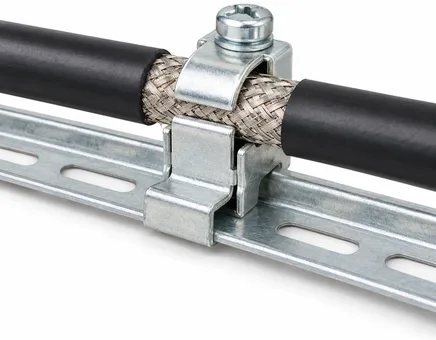
Braid pressed 360° under a metal clamp on an earthed rail. Never a pigtail.
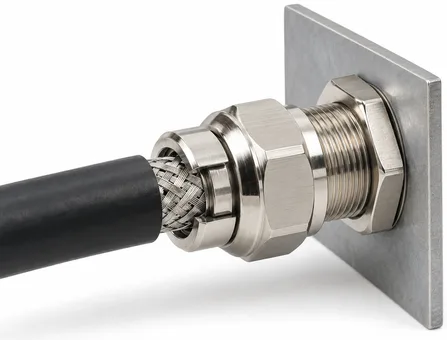
Earths the screen where the cable enters the panel, and seals the hole.
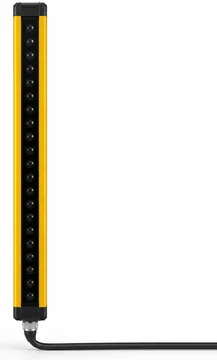
Group D. Its own cable, kept away from power cables.
Typical practice. Some drive and PLC makers ask for larger distances: their EMC guide decides. See also IEC 61000-5-2 and EN 50174-2.
| Cable group | Examples | Cable | Keep apart from |
|---|---|---|---|
| A · Power, noisy | Motor and VFD output, servo motor power, contactors, heaters, mains feeders | Screened for VFD and servo output (360° clamp both ends) | All of B and C: 200 to 300 mm, or an earthed metal divider |
| B · 24 V DC control | Sensors, solenoid valves, pushbuttons, lamps, relays, PLC digital I/O | Multicore, unscreened (screened in noisy areas) | Group A. Fine beside group C if the signals are screened |
| C · Analog and bus | 4 to 20 mA, 0 to 10 V, load cells, RTD, thermocouple, encoders, Ethernet, RS-485 | Screened twisted pairs, screen earthed at the panel end | Group A. Do not run alongside group B unscreened |
| D · Safety | Emergency stop, guard switches, light curtains | Multicore or screened as the maker says, own cores | Group A. Do not mix with standard control in one thin cable |
Cross at 90°
When a signal cable must cross a power cable, cross at a right angle. The coupling between them is smallest, and a short crossing does little harm.
Screens: where to earth
A VFD or servo motor cable has its screen clamped at both ends with a 360° clamp. An analog or encoder screen is normally earthed at the panel end only. Never use the screen as the signal return or the supply wire.
Drag chains and moving parts
Use cable made for a drag chain (fine strands, special jacket), never ordinary flexible cable. Do not mix power and signal cables in one chain without a divider, and respect the bend radius on the data sheet.
Inside the panel: layout and earthing
A clean back-plate is easier to build, test and repair. Put the noisy parts at one side and the quiet parts at the other, and let the wires flow in short, straight lines.
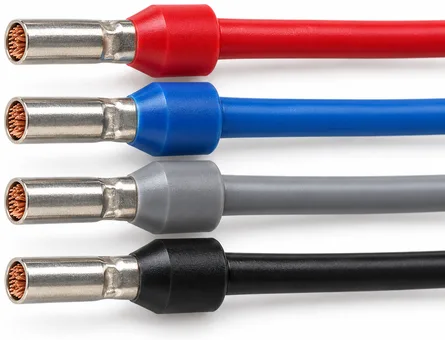
Colour sleeves: the colour shows the cross-section. Crimp with the right tool.
Glands go on the bottom plate, with the screen clamped as the cable enters.
One zone for power, one for control
Put the incomer, contactors and drives together, and the PLC with its I/O cards at the other side, with a wire duct between. Drive output cables run straight out of the panel to the gland plate, not past the PLC.
24 V distribution
Feed 24 V from a good supply through a fused or electronically protected rail, with one fuse per group (sensors, valves, drives, PLC). Run the 0 V as a rail too, tied to PE at one point only, as the PLC manual says.
Earthing
Mount the back-plate bare metal, bonded to the panel and the PE bar. Bond the door and the drives to it with short, wide braids. Land every screen on a clamp bonded to the gland plate. Keep the PE wire short and thick; it is a high-frequency path as well as a safety wire.
Wires, ferrules and labels
Fit a ferrule on every stranded wire and crimp with the right tool. Number each wire at both ends with the same number as the drawing. Use the control colours: black for power, red for AC control, blue for DC control, orange for interlocks supplied from outside the panel, green and yellow for PE only.
Spare capacity
Leave 10 to 20 % of spare I/O, terminals and duct space. Adding a sensor after delivery is the commonest change on every machine.
PLC cards at a glance
Match the device to the card before you buy it. A wrong card type is the most expensive wiring mistake.
| Card | For | What to check | Typical field cable |
|---|---|---|---|
| Digital input 24 V DC | Sensors, switches, buttons | Sinking or sourcing (PNP or NPN), input group common, input delay | 3 core 0.34 mm², M12 plug |
| Digital output transistor | Valves, lamps, small relays | Sourcing or sinking, current per output and per group, short-circuit protection | 2 or 3 core 0.5 mm² |
| Digital output relay | Contactors, 230 V loads, mixed voltages | Contact rating and life, interposing relay or snubber for inductive loads | Control cable, own fuse |
| Analog input | Transmitters, load cells (via amplifier), potentiometers | Current or voltage range, isolation, resolution, wire-break detection | Screened twisted pair |
| Analog output | VFD speed, valve positioners, servo analog command | 0 to 10 V or 4 to 20 mA, load resistance, isolation | Screened twisted pair |
| RTD / thermocouple | Pt100, Pt1000, thermocouple types | Sensor type, wire count, wire-break detection, cold junction | Screened pairs, matching extension cable |
| High-speed counter | Encoders, flow pulses | Maximum frequency, differential or single-ended, supply voltage | Screened twisted pairs |
| Pulse output (PTO) | Servo and stepper pulse and direction | Maximum frequency, 24 V or line driver, number of axes | Screened twisted pairs, short |
| Ethernet or fieldbus | Drives, remote I/O, HMI, cameras | Protocol, number of nodes, update time, switch type | Cat5e S/FTP or M12 D-code |
Before power, and when it does not work
Check in this order. Most faults are found in the first three steps without switching on.
- Wire numbers on the drawing, the wire ends and the terminals match.
- Every ferrule is crimped and every terminal tightened to its torque (pull each wire).
- Continuity check of every field cable from the device end to the PLC terminal.
- No short between +24 V and 0 V, and 24 V and PE, at the supply terminals.
- Insulation test on the mains and motor circuits with the electronics isolated (never on PLC or drive terminals).
- Screens are clamped where the drawing says, and only there.
- PE continuity from the door, the plate, the motors and every metal frame to the PE bar.
- Switch on in stages: 24 V first, then the PLC, then the field devices, then power and drives.
- Force each output and watch each input in the PLC with the machine safe, one device at a time.
| What you see | Likely cause | Check |
|---|---|---|
| Input never turns on | Wrong sensor type for the input common (PNP or NPN), no 0 V or 24 V at the sensor, broken wire | Measure 24 V at the sensor; check the input common; check the sensor LED |
| Input always on | Signal wire shorted to +24 V, wrong common, NC and NO swapped | Disconnect the wire at the PLC; the input should go off |
| Input flickers when a motor starts | Noise: signal cable beside power cable, no screen, poor 0 V | Reroute, screen the cable, add a filter or a diode on the coil that switches |
| Analog reading jumps or drifts | Ground loop (screen at both ends), noise, 0 V shared with power | Earth the screen at one end; check the input with a battery signal source |
| Analog reads under 4 mA | Wire break, 2-wire transmitter with no supply, wrong polarity | Measure the loop current in series |
| Output LED on, load does not run | Wrong load wiring, blown fuse, supply not connected to the output group | Measure at the load terminals under load |
| Valve chatters or weak | Voltage drop in a long thin cable, shared supply sag | Measure the voltage at the coil with the valve on |
| Servo or VFD trips at random | Motor cable and control cables together, no 360° clamp, no PE | Separate the cables, check the screen clamps and the PE |
| Encoder counts drift | A and B swapped, noise, screen not earthed, low supply at the encoder | Check the count by hand; check the supply voltage at the encoder |
| Fieldbus device offline | Cable fault, wrong address, loop, missing termination (RS-485) | Cable test, link LEDs, address and baud rate |
How it works
Where the diagrams come from
Each connection type is described as a list of stages (the field device, the panel terminals or an amplifier, and the PLC or drive) and a list of wires between terminals. The page draws the diagram and the wire list from that one description, so the two always agree.
What it does not do
It does not size cables, choose the PLC, or check a design. Use the Machine Wiring Guide for cable size, derating and voltage drop, and the Sensor Selector to choose a sensor.
Standards used
Control wire colours follow IEC 60204-1. Sensor colours and pins follow IEC 60947-5-2. Thermocouple colours follow IEC 60584-3. Cable separation follows common EMC practice (IEC 61000-5-2, EN 50174-2). Terminal names, pin numbers and colours of each maker differ: the maker's manual always decides.
User manual
What this page is for
It shows a machine builder how a field device is wired to the PLC: which wire goes where, what cable to use, which tray to put it in, and what to check. It is written for a mechanical or electrical designer who wires a machine and has the manuals of the devices and the PLC at hand.
How to use it
- In section 01 pick the device, then the connection type (for example PNP or NPN, 2-wire or 4-wire).
- Read the diagram from left to right: field device, panel terminals, PLC card or drive. Each coloured line is one wire. The text above the gaps names the cable and the tray.
- Follow the numbered steps, then use the wire list as your terminal schedule.
- Read Common mistakes and Test before you run before you energise.
- Use Print / save as PDF to give the sheet to the wireman, or Copy as text to paste it into an email.
Worked example 1: a PNP sensor 30 m from the PLC
Pick Digital sensor, then 3-wire PNP. The diagram shows brown to +24 V, blue to 0 V and black to the input. Use a 3 × 0.34 mm² cable in the 24 V DC compartment of the tray, 30 m long. On 24 V the voltage drop is well under one volt at a sensor current, so the sensor still gets about 24 V. The card common goes to 0 V, because a PNP sensor sends current into the input. Test with the sensor LED and the PLC input together.
Worked example 2: a 4 to 20 mA pressure transmitter
Pick Analog transmitter, then 2-wire loop-powered. The loop runs from +24 V, through the transmitter, into the analog input AI 0+ and back to 0 V at AI 0−. Use a screened twisted pair in the analog compartment, with the screen earthed at the panel end only. Set the card channel to 4 to 20 mA with wire-break detection. Check 4 mA at zero pressure and 20 mA at full scale, then scale the value in the program.
Worked example 3: a servo axis with pulse and direction
Pick Servo motor, then Pulse and direction. The PLC pulse and direction outputs go to the drive PULS and SIGN inputs on screened twisted pairs, kept short. The drive alarm goes back to a PLC input. The motor, brake and encoder cables run from the drive to the motor in drag-chain-rated cable, in the power compartment, with the screen clamped at 360° at the drive. Wire STO through a safety relay, not through the PLC.
Limits
This is a guide for first decisions. Terminal names, pin numbers and wire colours differ between makers. Safety circuits must be designed and validated to ISO 13849. Cable separation distances are typical practice, not a guarantee. A qualified person must review the wiring before it is energised.
What's new
- v1 · 24 Oct 2026
First release: wiring diagrams from the field device to the PLC for 13 device types and 26 connection types (PNP, NPN and 2-wire sensors; 2-wire and 3 or 4-wire transmitters; 4 and 6-wire load cells; 2, 3 and 4-wire RTD; thermocouple; DC and relay-driven solenoid valves; servo with pulse, analog and EtherCAT; stepper; VFD by terminals and Modbus; HTL and differential encoders; pushbuttons and lamps; E-stop and light curtain; Ethernet and RS-485), with wire lists, steps, common mistakes and test lists. Added the route from machine to PLC, cable tray separation, panel layout and earthing, PLC card types, a pre-power checklist and a fault-finding table.